
 |

|
|
|
|
|
|
DirectX |
|
ActiveMac |
|
Downloads |
|
Forums |
|
Interviews |
|
News |
|
MS Games & Hardware |
|
Reviews |
|
Support Center |
|
Windows 2000 |
|
Windows Me |
|
Windows Server 2003 |
|
Windows Vista |
|
Windows XP |
|
|
|
|
|
|
|
News Centers |
|
Windows/Microsoft |
|
DVD |
|
Apple/Mac |
|
Xbox |
|
News Search |
|
|
|
|
|
|
|
ActiveXBox |
|
Xbox News |
|
Box Shots |
|
Inside The Xbox |
|
Released Titles |
|
Announced Titles |
|
Screenshots/Videos |
|
History Of The Xbox |
|
Links |
|
Forum |
|
FAQ |
|
|
|
|
|
|
|
Windows XP |
|
Introduction |
|
System Requirements |
|
Home Features |
|
Pro Features |
|
Upgrade Checklists |
|
History |
|
FAQ |
|
Links |
|
TopTechTips |
|
|
|
|
|
|
|
FAQ's |
|
Windows Vista |
|
Windows 98/98 SE |
|
Windows 2000 |
|
Windows Me |
|
Windows Server 2002 |
|
Windows "Whistler" XP |
|
Windows CE |
|
Internet Explorer 6 |
|
Internet Explorer 5 |
|
Xbox |
|
Xbox 360 |
|
DirectX |
|
DVD's |
|
|
|
|
|
|
|
TopTechTips |
|
Registry Tips |
|
Windows 95/98 |
|
Windows 2000 |
|
Internet Explorer 5 |
|
Program Tips |
|
Easter Eggs |
|
Hardware |
|
DVD |
|
|
|
|
|
|
|
ActiveDVD |
|
DVD News |
|
DVD Forum |
|
Glossary |
|
Tips |
|
Articles |
|
Reviews |
|
News Archive |
|
Links |
|
Drivers |
|
|
|
|
|
|
|
Latest Reviews |
|
Xbox/Games |
|
Fallout 3 |
|
|
|
Applications |
|
Windows Server 2008 R2 |
|
Windows 7 |
|
|
|
Hardware |
|
iPod Touch 32GB |
|
|
|
|
|
|
|
Latest Interviews |
|
Steve Ballmer |
|
Jim Allchin |
|
|
|
|
|
|
|
Site News/Info |
|
About This Site |
|
Affiliates |
|
Contact Us |
|
Default Home Page |
|
Link To Us |
|
Links |
|
News Archive |
|
Site Search |
|
Awards |
|
|
|
|
|
|
|
Credits |



 |
Product:
CorelDraw 9 - Office Edition
Company: Corel Corporation
Website: http://www.corel.com
Estimated Street Price: $249.00 Upgrade: $169.00
Review By: Julien Jay
Features
|
Table Of Contents |
CorelDraw 9 is a vector-based drawing software that lets users create professional artwork, from simple logos to intricate technical illustrations. The CorelDraw 9 Office Edition provides corporate dedicated tools that we�ll study bellow.
Corel Draw 9.0 Office edition allows you to create a wide range of documents due to its great and useful models such as websites, visit cards, graphs, adds, etc� This model really looks good and professional. When you start CorelDraw 9 the following Corel Welcome screen is displayed:
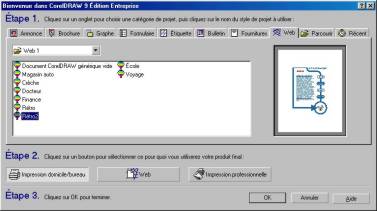
It�s your starting point! Here you�ll select what appropriate models you want to use and what they are dedicated to: for printing, for the web or for professional printing. You�ve got for example a list of Web models that are very beautiful. Sure your Website created with Corel Presentations 9 can contain multiple pages and it fully support Internet links. We also regret that when you create web-dedicated documents you can�t preview them while they are in design with the default browser like Microsoft Internet Explorer. Corel has included a Web publication applet to Draw 9 so you can save your web in HTML format and check is there�s no link error and you even send your new website to your FTP with the publish to the web wizard. Sure CorelDraw will produce HTML files but it�s not a FrontPage 2000 like website creator software so you won�t be able to inserts JAVA, DHTML, banners, modify HTML source code� We recommend the use of a real website creator/editor software instead of using Corel Draw!
One of the special new features of this office edition is the �organizational chart� wizard. Corporate always need to build this kind of chart to graphically represents their ideas or their organization. So instead of buying an expensive Visio like software the use of Draw 9 Office will help you! The wizard will guide you to enter the hierarchical information so it�ll draw them itself. But you can choose the line styles, the font styles� Also in Draw 9 Office you can add real graph by using Corel Presentations: click on the graph button and Corel Presentations graph feature will appear in Draw 9 Office once again due to its OLE 2 support. Sure this is not Quattro Pro or Excel but it�ll produce high impact graphs that you can customize easily. CorelDraw 9 Office edition is MDI software like CorelDraw 9 but it includes on the taskbar buttons to switch from documents. This is really a great improvement!


