
 |

|
|
|
|
|
|
DirectX |
|
ActiveMac |
|
Downloads |
|
Forums |
|
Interviews |
|
News |
|
MS Games & Hardware |
|
Reviews |
|
Support Center |
|
Windows 2000 |
|
Windows Me |
|
Windows Server 2003 |
|
Windows Vista |
|
Windows XP |
|
|
|
|
|
|
|
News Centers |
|
Windows/Microsoft |
|
DVD |
|
Apple/Mac |
|
Xbox |
|
News Search |
|
|
|
|
|
|
|
ActiveXBox |
|
Xbox News |
|
Box Shots |
|
Inside The Xbox |
|
Released Titles |
|
Announced Titles |
|
Screenshots/Videos |
|
History Of The Xbox |
|
Links |
|
Forum |
|
FAQ |
|
|
|
|
|
|
|
Windows XP |
|
Introduction |
|
System Requirements |
|
Home Features |
|
Pro Features |
|
Upgrade Checklists |
|
History |
|
FAQ |
|
Links |
|
TopTechTips |
|
|
|
|
|
|
|
FAQ's |
|
Windows Vista |
|
Windows 98/98 SE |
|
Windows 2000 |
|
Windows Me |
|
Windows Server 2002 |
|
Windows "Whistler" XP |
|
Windows CE |
|
Internet Explorer 6 |
|
Internet Explorer 5 |
|
Xbox |
|
Xbox 360 |
|
DirectX |
|
DVD's |
|
|
|
|
|
|
|
TopTechTips |
|
Registry Tips |
|
Windows 95/98 |
|
Windows 2000 |
|
Internet Explorer 5 |
|
Program Tips |
|
Easter Eggs |
|
Hardware |
|
DVD |
|
|
|
|
|
|
|
ActiveDVD |
|
DVD News |
|
DVD Forum |
|
Glossary |
|
Tips |
|
Articles |
|
Reviews |
|
News Archive |
|
Links |
|
Drivers |
|
|
|
|
|
|
|
Latest Reviews |
|
Xbox/Games |
|
Fallout 3 |
|
|
|
Applications |
|
Windows Server 2008 R2 |
|
Windows 7 |
|
|
|
Hardware |
|
iPod Touch 32GB |
|
|
|
|
|
|
|
Latest Interviews |
|
Steve Ballmer |
|
Jim Allchin |
|
|
|
|
|
|
|
Site News/Info |
|
About This Site |
|
Affiliates |
|
Contact Us |
|
Default Home Page |
|
Link To Us |
|
Links |
|
News Archive |
|
Site Search |
|
Awards |
|
|
|
|
|
|
|
Credits |


Product:
NetFlow 2.1
Company: Ora-Creative
Website: http://www.ora-creative.fr
Estimated Street Price: $30.00
Review By: Julien Jay
Introduction
Every web surfer knows that downloading files can be painful due to many factors: huge file size, server failure, bad quality internet connection, human errors, power cut, etc�There�s a solution for all this annoying issues. Since a few months we�ve seen many download managers, but one has retained all our attention. It�s NetFlow 2.1. This program is a shareware and it was made by a young French startup. Yep, French have also got �Savoir-faire� to build amazing software! By the way this software has received awards by Ziff-Davis and France Telecom.
Installation & Startup
After you have download the file or insert the CD a quick and easy setup will start. It�s based on the Windows Installer technology so there shouldn�t be any problem during setup. Enter your name and your serial number and it�s done. You�re ready to enjoy advanced download management.
NetFlow automatically starts with Windows 98. It takes place in the tray notification area. NetFlow comes with a superb black interface that contains all the information & features you need to achieve great downloads! In one window it presents send/receive flow information and downloading information. But you can also reduce the window to just show in a gauge the send/receive flow.
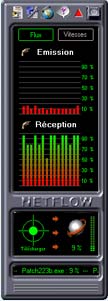
Features
NetFlow monitors your Internet connection to show you the flow of your bandwidth: and you�ll also be able to see how much bytes you send and how much bytes you received. But that�s not all, sure. To download a file simply drag & drop the file link to the �download� hotspot of NetFlow 2.1. The download will start and you�ll be prompted to choose a folder to store the file. NetFlow will show you during the download the accomplished download percentage and a little animation will make you wait. During the file download you can also dropped other files to download where you�ll be able to choose when they should be download and what to do when they�re downloaded. A little button will stop your Internet connection. And finally it included a resume download feature! So if when NetFlow was retrieving and the Internet dialup hanged up. You can resume the file download process! Great feature!
But that�s not all! You can schedule download to start during the night to save money on your phone invoices! You can define an action for this scheduling: once the last file is downloaded the Internet connection can be cut and the computer can be shutdown automatically. You can even limit the Internet connection till a defined hour. Great, isn�t it? But you can also define a maximum time to surf the net by day so once you�ve exceed the allowed download time you won�t be able to connect you to the net before the next day!
You can also blocked any Internet connection between a certain time period� So you won�t have any surprise and your child, employee won�t surf the net when you don�t want to! Sure this feature is protected by a password.
During downloading files you can view the entire scheduled file download event in one window. Each file will be shown with a specific colour: white for files that are in wait state, green for files that are currently downloaded, yellow for a temporary download break, and red for files that can�t be downloaded.
Final Comments
| How It Grades | ||||
 |
Setup:
95% Download Manafment: 85% Features: 80% Cost: 90% Ease of Use: 80% Overall: 85% |
|
||
|
||||
NetFlow is very good software for a reasonable price. It provides advanced features to power Internet users. We�ve noticed a few problems: you can�t download file that requires a CGI script, you can�t download files on a HTTPS website and finally you can�t set on top the window of NetFlow. But we�re sure that all this minor problems will be solved in next free updates.
So why wait, download a preview here:
http://www.ora-creative.fr/gb/home/index.html.
| Specs & Package | |
| Overall Score | 85% |
| Version Reviewed | NetFlow 2.1 |
| Release Date | Out Now |
| In The Box? | 1
CD 1 Manual |
| The Good Points | Setup Downloading |
| The Bad Points | File
Restraints |
| Similar To | N/A |
| Reviewers PC Setup | Pentium
II 450 Windows 98 Second Edition 256 MB SD-Ram Matrox G400 32MB AGP Graphics Card DirectX 7a SoundBlaster Live! Value 17" LG Electronics Monitor |
| PC Required | Windows
95/98 Pentium 100 or Higher CD-Rom 16 MB Ram 16 MB HD Space |


