
 |

|
| ActiveWin: Reviews | Active Network | New Reviews | Old Reviews | Interviews |Mailing List | Forums |
|
|
|
|
|
DirectX |
|
ActiveMac |
|
Downloads |
|
Forums |
|
Interviews |
|
News |
|
MS Games & Hardware |
|
Reviews |
|
Support Center |
|
Windows 2000 |
|
Windows Me |
|
Windows Server 2003 |
|
Windows Vista |
|
Windows XP |
|
|
|
|
|
|
|
News Centers |
|
Windows/Microsoft |
|
DVD |
|
Apple/Mac |
|
Xbox |
|
News Search |
|
|
|
|
|
|
|
ActiveXBox |
|
Xbox News |
|
Box Shots |
|
Inside The Xbox |
|
Released Titles |
|
Announced Titles |
|
Screenshots/Videos |
|
History Of The Xbox |
|
Links |
|
Forum |
|
FAQ |
|
|
|
|
|
|
|
Windows XP |
|
Introduction |
|
System Requirements |
|
Home Features |
|
Pro Features |
|
Upgrade Checklists |
|
History |
|
FAQ |
|
Links |
|
TopTechTips |
|
|
|
|
|
|
|
FAQ's |
|
Windows Vista |
|
Windows 98/98 SE |
|
Windows 2000 |
|
Windows Me |
|
Windows Server 2002 |
|
Windows "Whistler" XP |
|
Windows CE |
|
Internet Explorer 6 |
|
Internet Explorer 5 |
|
Xbox |
|
Xbox 360 |
|
DirectX |
|
DVD's |
|
|
|
|
|
|
|
TopTechTips |
|
Registry Tips |
|
Windows 95/98 |
|
Windows 2000 |
|
Internet Explorer 5 |
|
Program Tips |
|
Easter Eggs |
|
Hardware |
|
DVD |
|
|
|
|
|
|
|
ActiveDVD |
|
DVD News |
|
DVD Forum |
|
Glossary |
|
Tips |
|
Articles |
|
Reviews |
|
News Archive |
|
Links |
|
Drivers |
|
|
|
|
|
|
|
Latest Reviews |
|
Xbox/Games |
|
Fallout 3 |
|
|
|
Applications |
|
Windows Server 2008 R2 |
|
Windows 7 |
|
|
|
Hardware |
|
iPod Touch 32GB |
|
|
|
|
|
|
|
Latest Interviews |
|
Steve Ballmer |
|
Jim Allchin |
|
|
|
|
|
|
|
Site News/Info |
|
About This Site |
|
Affiliates |
|
Contact Us |
|
Default Home Page |
|
Link To Us |
|
Links |
|
News Archive |
|
Site Search |
|
Awards |
|
|
|
|
|
|
|
Credits |



|
Dell�
UltraSharp� 24-inch Widescreen Monitor - 2407WFP |
Introduction
Dell have been well known for producing excellent computers, both for on a budget users and for high-spec gamers, a few years ago Dell started to create their own brand of LCD displays, each one becoming better than the last. This is our first review of a Dell monitor and I'm very pleased to say that it doesn't disappoint in any category.
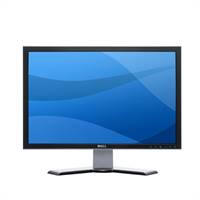
The Dell� UltraSharp�2407WFP 24-inch Widescreen Flat Panel LCD Monitor is a wide aspect desktop display that redefines the performance of LCD displays with a stylish Dell� industrial design, and advanced functionality. With the UltraSharp� 2407WFP monitor, you can watch DVDs in natural format, run multiple applications simultaneously and improve productivity with less scrolling and toggling. Featuring enhanced features such as the 15-pin D-Sub, DVI-D with HDCP support, S-Video, Composite and Component Connectors, as well as 4 x Integrated powered USB 2.0 ports and a 9-in-2 Media Card Reader, the UltraSharp�2407WFP monitor gives users convenient access to plug in many different devices such as media cards, digital cameras and other electronic devices. It also supports advanced features such as anti-glare with hard-coating 3H and can be activated with a touch of a button on the front of the display. With an integrated height adjustment stand, users can adjust the display to their exact comfort level and help reduce eye and neck strain. The UltraSharp� 2407WFP Flat Panel LCD Monitor comes with a standard 3-Year Warranty.
- Clear, sharp images at a maximum resolution of up to 1920x1200 pixels
- Supports advanced features like PIP (Picture in Picture) and PBP (Picture By Picture), DCDi� by Faroudja (Directional Correlational Deinterlacing) Processing, ACM� (Active Colour Management) and ACC� (Adaptive colour and Contrast) technologies
- Add multimedia capability to Dell�UltraSharp� 2407WFP display with the optional AS501 sound bar.
Manufacturer Part : 860-10023
Dell Part : 59234Features & Benefits
- Monitor size and type : 24" (61.0cm) active matrix TFT
- Resolution : 1920 x 1200 / WUXGA
- Response time / Brightness / Contrast Ratio : 16ms (black to white) or 6ms (grey to grey) / 450 cd/m2/ 1000:1
- Dimensions (w x h x d) : 585mm x 388mm (extended/compressed) x 560mm x 195mm
- Weight : 8.3 kg
- Inputs : Analog DVI-D (Digital) with HDCP / S-Video / Composite / Component
- Height adjustable stand / Audio capability : Yes / Optional AS501 soundbar
- VESA mounting compatible / Security slot : Yes (100mm) / Yes
- Integrated powered USB 2.0 hub / 9-in-2 card reader : 4 downstream, 1 upstream ports / CompactFlash type I/II Card, MicroDrive, Smart Media Card, Memory Stick Card, Memory Stick Pro Card, Memory Stick Duo (with Adapter), Secure Digital Card, MultiMedia Card, Mini Secure Digital (with Adapter)
- Warranty : 3-years next business day exchange
Excellent Multimedia, Video and Graphics Experience
- DVI (Digital Video Interface) Connector with HDCP (High-Bandwidth Digital Copy Protection) Ready
- DVI helps to ensure high quality image (no jitter), and stupendous color uniformity.
- HDCP helps enable viewing of protected high-definition content.- S-Video, Composite and Component Connector
- Allows connection to other video devices such as game consoles and cable boxes.- DCDi� by Faroudja (Directional Correlational Deinterlacing) Processing
- Helps to eliminate jagged edges and provide image enhancements; making movie watching experience enjoyable.- Adaptive Color and Contrast (ACCTM) Technology: An intelligent contrast enhancement for viewing video content.
- Helps to enhance contrast in luminance range where such enhancements are desirable; resulting in impressive image detail.- Active Color Management (ACMTM): Designed to support most viewing modes with enhanced color saturation.
- Optimal image quality for various usage modes. Easy color management through selection of 6 different usage modes (Theatre, Sports, Nature, Gaming, Desktop and Multimedia).- Picture In Picture / Picture By Picture Function
- View multiple sources through Picture-in-Picture or Picture-by-Picture functionality.
 |
 |
 |
|
| UltraSharpTM 2007WFP | UltraSharpTM 2407WFP | UltraSharpTM 3007WFP | |
|
Screen size (diagonal) Horizontal Vertical |
20.1" (51 cm) 433mm 271mm |
24" (61 cm) 518mm 324mm |
30" (76 cm) 641mm 400mm |
| Pixel Pitch | 0.258mm | 0.270mm | 0.250mm |
| Resolution | 1680 x 1050 / WSXGA+ |
1920 x 1200 / WUXGA |
2560 x 1600 / WQXGA1 |
| Brightness (typical) | 300 cd/m� | 450 cd/m� | 400 cd/m� |
| Contrast Ratio | 800:1 | 1000:1 | 700:1 |
| Response Time (typical) | 16ms(black to white) | 6ms (grey to grey) / 16ms (black to white) | 11ms(grey to grey)/14ms(black to white) |
|
Additional Features USB ports Media Card Reader Multimedia Capability (Soundbar) Security lock slot |
4x USB 2.0 No Optional AS501 Yes |
4 x USB 2.0 9-in-2 Media Card Reader Optional AS501 Yes |
4 x USB 2.0 9-in-2 Media Card Reader Optional AS501 Yes |
|
Stand features Tilt Swivel and Portrait Height Adjustable Cable Management |
Yes Yes Yes(100mm) Yes |
Yes Yes Yes(100mm) Yes |
Yes Swivel only Yes(90mm) Yes |
|
Dimensions Height (fully extended landscape mode) Height (compressed/locked landscape mode) Width Depth |
513mm 332mm 473mm 178mm |
585mm 388mm 560mm 195mm |
559mm 469mm 449mm 200mm |
| Weight | 6.5kg | 8.3kg | 11.38kg |
| VESA Mounting Compatble | Yes (100mm) | Yes (100mm) | Yes (100mm) |
|
Viewing Angle Horizontal Vertical |
+/- 89� +/- 89� |
+/- 89� +/- 89� |
+/- 89� +/- 89� |
|
Input Signal Connector Analogue Interface Digital Interface Other |
15-pin-D-subminiature DVI-D S-video, Composite |
15-pin-D-subminiature DVI-D (HDCP Ready) S-video, Composite, Component |
None DVI-D (Dual Link) with HDCP None |
| Picture in Picture | Yes | Yes | No |
| Available Colours | Black | Black | Black |
| TCO Approval | TCO '99 | TCO '99 | TCO '99 |
| Internal Power Supply | Yes | Yes | Yes |
|
Energy Consumption Typical - Maximum Standby |
55W-75W 2W or less |
57W-110W 2W or less |
147W-177W 3W or less |
| Faceplate coating | Anti-glare with hard coating 3H | Anti-glare with hard coating 3H | Anti-glare with hard coating 3H2 |
|
Scan Range Horizontal Vertical |
30 kHz to 81 kHz 56 Hz to 76Hz(1680x1050-60Hz only) |
30 kHz to 81 kHz 56 Hz to 76 Hz (exception 1920 x 1200 at 60 Hz only) |
49.31 kHz to 98.71 kHz 60 Hz (2560x1600) |
System Setup
As this is now our first major Monitor review, we have made sure our hardware is as good as we can get our review machine up to. As you can see, we have the AMD Athlon 64 X2 5000+ AM2 Processor at the heart of the machine, along with the best memory you can get. We also have the Connect 3D X1900 XT graphics card to make sure the monitor displays its colour settings as well as possible. Our desktop thoughout this whole review is set at the optimum resolution for the Dell monitor - 1920x1200
The Hardware
- Athlon 64 X2 5000+ AM2 Based Processor
- Asus M2N32-SLI Deluxe
- Corsair 1GB DDR2 XMS2-8500 TwinX
- Connect 3D X1900 XT 512MB PCI-Express Graphics Card
- Sound Blaster X-Fi
- 1-Samsung Spinpoint 250GB SP2504C SATA 8MB Cache Hard Drive
- 1-Maxtor OneTouch II 250GB External Firewire/USB 2.0 16MB Cache Hard Drive
- Sony Dual Layer DVD-RW DRU700A Drive
- Microsoft Wireless Laser Mouse 6000
- Antec 480 Watt NeoPower PSU
Benchmarks & Information
Reviewing monitors is always a hard task as there are many different factors that go into them and a lot of the time it is really personal choice in the end. As you already know, the Dell monitor is a 24-Inch Widescreen LCD, it is full of great features and not only that, it also has a number of good connections on the monitor so that you are not just stuck with computing, you could attach a HD-Box or even an Xbox 360 directly to it via DVI or though Component video. There are other great monitors on the market, but for both quality and connections, the Dell really pushes itself in front.
As with some of the previous Dell monitors, this one has its simple but nice looking Black and Silver colour scheme. You can move the display from Landscape to Portrait modes and tilt the panel forward and back, as well as moving the display left and right by 45 degrees. The inputs on the display are located at the back of the monitor. They are pretty easy to access when the monitor is put into portrait position. The inputs themselves are the following. One upstream and two downstream USB 2.0 ports, DVD-D and VGA inputs, 12-volt audio jack for connecting an optional Dell speaker. You also have Composite, Component and S-Video connections too. At the left side of the monitor you have two more USB 2.0 ports and a 9-in-2 media card reader, which works very well by the way. The only downside to all these connections is trying to hide the cables, as the monitor could benifit from something around the back to keep them as tidy as possible.
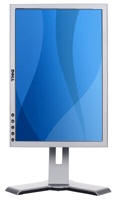
As mentioned earlier, the tests we have run are all based at the full optimum resolution of the monitor at 1920x1200, as expected, the Dell looked great. Test was very dark and easy to read, I also asked members of the family to try it out, some with lesser eyesight than me, and they all thought the monitor was one of the best they had seen. The monitor is rated at 6-Milliseconds and although this is pretty hard to rate this, the monitor did very well in both DVD tests and in games. Now the colour, everything was vivid, especially in some of the more brighter and arty games such as Dreamfall and Half Life 2: Episode 1.
The onscreen menu is the same across all of the latest Dell Monitors. The menu is on the bottom of the monitor and each option has its own menu, they are Brightness, Input Source, Colour Settings, Image Modes, Display Settings, Menu Settings and PIP Settings, I found that the menus were easy to navigate round, although an exit button would have been nice instead of having to wait for the options to just disappear. One cool thing is that the image modes option allows you to try out three presets, they are Desktop, Multimedia and Gaming, they do make a slight difference, although I had the tendency to just stick with the Desktop setting all the time.
The monitor also comes with HDCP on the DVI-D port, this means you can connect up High Definition ready products such as a HD-DVD player, BluRay or even SkyHD box to it and watch everything is fantastic detail in full 1080i resolutions. Sitting too close to a monitor of this size does tend to show up more digital noise on the screen, even with HD content, so a more sensible sitting place is needed when viewing movies. As usual, Dell has gone with the standard three-year warranty on parts, labor and any backlight issues, this can be extended by up to two years if you wanted to as well.
Display Mate Tests:
This program lets us test out colour banding and compression.
|
Monitor
|
Mark |
|---|---|
| Dell Ultrasharp 2407WFP | 74 |
| Samsung SyncMaster 244T | 72 |
| BenQ FP231W | 70 |
High Quality Photos Test:
As some of you already know, I'm big into photography (http://www.byronhinson.com) so having a good monitor to check shots out and to edit them in photoshop or on the Mac I like to have a large monitor with good colour reproduction. Overall I was very pleased with what I saw, there were some photos that looked better on the Samsung SyncMaster 244T, but you would have to look very hard to find any other problems. The good thing for photographers is the addition of memory card support on the side of the monitor, it works perfectly and it becomes very easy to view your photos quickly straight from your cameras memory card if you want to do it that way.
Conclusion
| How It Grades |
|
Installation:
93% Ease Of Use: 93% Picture Quality: 94% Features: 92% Drivers: 90% Design: 92% Manual: N/A Price: 87% Overall: 92% |
I have been really pleased with the time I have spent
with the 2407WFP monitor, the colours are excellent, the response rate
is high for gaming and the size of the screen is perfect for high
definition content as well as working on the Windows desktop. Another
plus is that I really liked the styling of the casing, its minimal just
like Apple's monitors and leaves you just focusing on the screen itself
rather than outer shine from over styled casings. The massive range of
inputs also helps with the high mark, connecting a 360, PS2, Sky HD and
a computer to it is possible and you can't say that for many PC
monitors.

Feel free to comment on the review here.
| Specs & Package | |
| Overall Score | 92% |
| Version Reviewed | Dell� UltraSharp� 24-inch Widescreen Monitor - 2407WFP |
| Release Date | Out Now |
| The Good Points |
Hardly needs any configering Excellent Colours and Response Rate Easy to use menus Great for high-end gaming |
| The Bad Points | Very slight ghosting |
| Reviewers PC Setup |
Athlon 64 X2 5000+ AM2 Based
Processor Asus M2N32-SLI Deluxe Corsair 1GB DDR2 XMS2-8500 TwinX Connect 3D X1900 XT 512MB PCI-Express Graphics Card Sound Blaster X-Fi 1-Samsung Spinpoint 250GB SP2504C SATA 8MB Cache Hard Drive 1-Maxtor OneTouch II 250GB External Firewire/USB 2.0 16MB Cache Hard Drive Sony Dual Layer DVD-RW DRU700A Drive Microsoft Wireless Laser Mouse 6000 Antec 480 Watt NeoPower PSU Apple 20" Anodized aluminum Cinema Display |


